その他の例
こんなゲームも作れる
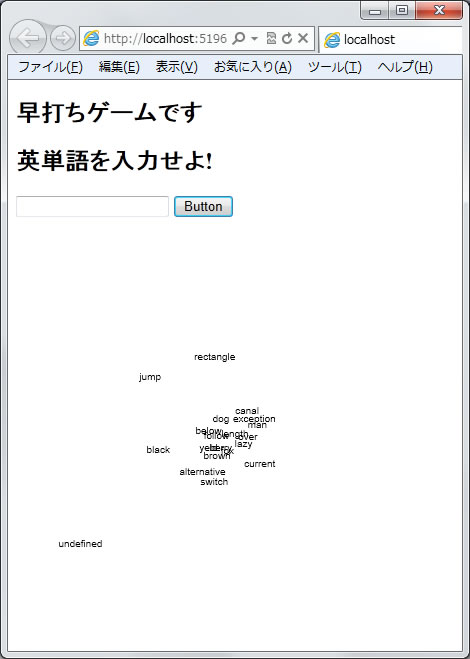
画面に表示された英単語をタイプする、早打ちゲーム
default.aspx のコーディング
適当な場所(たとえば < h2 > 見出しが置かれる場所)に以下のタグを記述する
<h2>    早打ちゲームです     </h2>
<h2>    近づいてくる英単語を入力せよ!     </h2>
<p>
  <asp:TextBox ID="TextBox1" runat="server"></asp:TextBox>
  <asp:Button ID="Button1" runat="server" Text="Button" />
</p>
<canvas id="canvas_id" width="400" height="400"></canvas>
<script type="text/javascript">

// この行のすぐ下にプログラムを挿入する

</script>
javascriptのプログラム。
先のaspxのコードの「この行のすぐ下にプログラムを挿入する」 と記載したすぐ下に以下のプログラムを書く/* canvas要素のノードオブジェクト */ var canv1 = document.getElementById('canvas_id'); var x1 = Array(20); var y1 = Array(20); var d1 = Array(20); var tx1 = Array(20); tx1 = ["brown", "fox", "jump", "over", "lazy", "dog", "man", "canal", "black", "berry", "follow", "alternative", "below", "length", "yeld","rectangle","exception","switch","current"]; onload = function () { draw_canvas(); }; function tick1() { var j = 0; var c1 = canv1.getContext('2d'); c1.clearRect(0, 0, 400, 400); for (j = 0; j < 20; j++) { var x = (x1[j] -200) * 400 / d1[j] + 200; var y = (y1[j] - 200) * 400 / d1[j] + 200; c1.beginPath(); c1.fillText(tx1[j], x, y); d1[j] = d1[j] - 40; if (d1[j] < 40) { d1[j] = 4000; } } } function draw_canvas() { var j = 0; /* canvas要素の存在チェックとCanvas未対応ブラウザの対処 */ if (!canv1 || !canv1.getContext) { return false; } for (j = 0; j < 20; j++) { x1[j] = Math.floor(Math.random() * 400); y1[j] = Math.floor(Math.random() * 400); d1[j] = Math.floor(Math.random() * 4000); } setInterval(tick1, 50); }以上を入力したら、実行ボタンを押せば、最初の画面が表示される。
課題 このサンプルプログラムは、得点をサーバが記録する機能がない。
それらの機能を実現するには何が必要だろうか。